

Markdown
`同步翻译 整理 Markdown 官方 和 其他优秀归纳文章即可
参考 Ametrine主题开发者本人网站, 博客源码参照 而 主题内置的 样例博客可作为重要参考
对自身的要求仅是 熟练使用,无 迁移 晋升的 空间
Markdown
Text can be bold, italic, strikethrough, and all at the same time.
Link to another page[1].
标题
There should be whitespace between paragraphs[2].
| 段落 |
要创建段落,请使用空行分隔一行或多行文本。
换行
借助 Alfred 的快捷文本
mkbr进行快速触发<br/>
“Original content is original only for a few seconds before getting old”
Rule #21 of the internet 加粗字体
**
引用块 ✅
嵌套引用块
要创建引用块,请在段落前添加 >。引用块可以嵌套。在要嵌套的段落前添加
>>。
- 包含其他元素的引用块
- 引用块可以包含其他 Markdown 格式的元素。
并非所有元素都可以使用——你需要进行实验以查看哪些元素有效。
Useful information that users should know, even when skimming content.
Helpful advice for doing things better or more easily.
Key information users need to know to achieve their goal.
Urgent info that needs immediate user attention to avoid problems.
Advises about risks or negative outcomes of certain actions.
有序列表
添加带有数字和句号的行项目。数字不必按数字顺序排列,但列表应从数字一开头。
无序列表
在行项目前添加破折号 (-)、星号 (*) 或加号 (+)。
缩进一个或多个项目以创建嵌套列表。
为了兼容性,请不要在同一列表中
混合和匹配分隔符——选择一个并坚持使用它。
第一项
第二项
第三项
- 缩进项
- 缩进项
第四项
Item 1
Item 2
- Item 2.1
- Item 2.2
Item 3
Item 4
- Perform step #1
- Proceed to step #2
- Conclude with step #3
- Milk
- Eggs
- Flour
- Coffee
- Combustible lemons
要在列表中
添加另一个元素,同时保留列表的连续性,请将元素缩进四个空格或一个制表符,如下例所示。
This is the first list item.
Here’s the second list item.
A blockquote would look great below the second list item.
And here’s the third list item.
代码
| Character | Show | Quotes |
|---|---|---|
| Derpy Hooves | My Little Pony | I just don’t know what went wrong |
| Gir | Invader ZIM | GUESS WHO MADE WAAAAFFLES?!! |
| WALL-E | WALL-E | Ooooo 0.0 |
| Taco | Inanimate Insanity | SOUR CREAM! |
let highlight = true;pre mark {
display: block;
color: currentcolor;
}
pre table td:nth-of-type(1) {
color: #6b6b6b;
font-style: italic;
}水平线 ✅
单独的一行上使用三个或更多星号 (***)、破折号 (—) 或下划线 (___)[3]。
Components - 组件
Ametrine provides a few useful components that simplify some tasks. They can be used on all pages.
As of version 0.21.0, Zola supports GitHub flavored alerts natively, without this component. It can be enabled by adding the following to
zola.toml:[markdown] github_alerts = true
Required variables are:
icon: Icon from phosphoricons.com that will be used in the alert.title: Title of the alert.
Optional variables are:
color: Color that the alert should be colored into. Available colors are:red,orange,yellow,green,blue, andpurple.
Hi, I’m a fake custom alert.
- I’m a list with an inline link.
链接 ⭐
必须是英文引号 填充悬浮提示
添加标题 您可以选择为链接添加标题。当用户将鼠标悬停在链接上时,它将显示为工具提示。要添加标题,请在 URL 后用引号将其括起来。eg: Duck Duck Go.
[Duck Duck Go](https://duckduckgo.com "The best search engine for privacy").
[Spotify](https://open.spotify.com/playlist/7zbBvAvpb9NJfkO0e7lJx3)
Images and Videos
By default images and videos come with some generic styling, such as rounded corners and shadow. To fine-tune these, you can use components with different argument combinations.
Available variables are:
url: URL to an image.url_min: URL to compressed version of an image, original can be opened by clicking on the image.alt: Alt text, same as if the text were inside square brackets in Markdown.full: Forces image to be full-width.start: Float image to the start of paragraph and scale it down.end: Float image to the end of paragraph and scale it down.pixels: Uses nearest neighbor algorithm for scaling, useful for keeping pixel-art sharp.has_alpha: Removes rounded corners and shadow, useful for images with transparency.drop_shadow: Uses drop shadow instead of box shadow, useful for images with transparency.no_hover: Removes zoom on hover. 悬停取消缩放spoiler: Blurs image until hovered over/pressed on, useful for plot rich game screenshots. 模糊图像,直到悬停/点击 适用 内容丰富敏感的内容spoilerwithsolid: Ditto, but makes the image completely hidden.
{{ <image src="graph.png" alt="This is an image" class="no-hover"/> }}
Alternatively, you can append the following URL anchors. It can be more handy in some cases, e.g. such images will render normally in any Markdown editor, opposed to the Zola components.
#full: Forces image to be full-width.#start: Float image to the start of paragraph and scale it down.#end: Float image to the end of paragraph and scale it down.#pixels: Uses nearest neighbor algorithm for scaling, useful for keeping pixel-art sharp.#has-alpha: Removes rounded corners and shadow, useful for images with transparency.#drop-shadow: Uses drop shadow instead of box shadow, useful for images with transparency.#no-hover: Removes zoom on hover.#spoiler: Blurs image until hovered over/pressed on, useful for plot rich game screenshots.#spoilerwith#solid: Ditto, but makes the image completely hidden.

 Lorem ipsum dolor sit amet, consectetur adipiscing elit, sed do eiusmod tempor incididunt ut labore et dolore magnam aliquam quaerat voluptatem. Ut enim aeque doleamus animo, cum corpore dolemus, fieri tamen permagna accessio potest, si aliquod aeternum et infinitum impendere malum nobis opinemur.
For videos it’s all the same except for a few differences: no_hover and url_min variables are not available.
Additionally, the following attributes can be set:
autoplay: Start playing the video automatically.controls: Display video controls such as volume control, seeking and pause/resume.loop: Play the video again once it ends.muted: Turn off the audio by default.playsinline: Prevent the video from playing in fullscreen by default (depends on the browser).
{{ <video sources={["video.webm"]} alt="This is a video" controls={true}/> }}CRT
Alright, this one doesn’t simplify anything, it just puts ASCII art into a CRT-like box.
As this element is intended to be purely decorative (e.g. for displaying ASCII art), it is hidden from screen readers unless a
labelis supplied. Ensure that no vital content is wrapped in it.
{% <crt label="ASCII illustration of public library halls."> %}
-> ASCII art <-
{% </crt> %}Alternatively, if you have syntax highlighting enabled and you need to preserve whitespace, you can use a code block with crt=true added right after three backticks.
The downside of this approach is that it will keep the ASCII art accessible to screen readers, which is bad for accessebility. Whitespace issue should hopefully be fixed with the release of Zola 0.23.0. See #116.
```crt=true
  /\
 /  \
/____\
```
/\
/ \
/____\Audio
Places a useless audio button with a funny hover animation. Needs extra.audio_button to be enabled on page, section, or config level for it to work.
{{ <audio name="Party!" url="party-horn.mp3"/> }}Hi everyone! You know what I like doing? That’s right, throwing ! Actually I don’t I just wanted to show off audio button.
YouTube
Allows to embed a YouTube video using youtube-nocookie.
Available variables are:
autoplay: Whether the video should autoplay.start: On which second video should start.
{{ <youtube id="0Da8ZhKcNKQ"/> }}Vimeo
Allows to embed a Vimeo video.
Available variables are:
autoplay: Whether the video should autoplay.
{{ <vimeo id="869483483"/> }}BiliBili
[!NOTE] B站版本的视频调用方式我要仿写实现
Overflow Auto
Sometimes, an element gets too wide, and it’s not possible to make it adaptive in any sensible way (think tables), this is when this component comes in.
{% <overflow_auto> %}
Table (for example)
{% </overflow_auto> %}
Accepts either of the two optional arguments:
overshoot: Adds a vertical overshoot, to make the cutoff visually nicer.overshoot_row: Ditto, but horizontal.
{% <overflow_auto overshoot_row={true}> %}
| #   | Song                          | Artist        | Duration | Popularity | Genres | Year | Added      |
| --- | ----------------------------- | ------------- | -------- | ---------- | ------ | ---- | ---------- |
| 1   | Good Morning                  | gifting guide | 03:22    | 2          |        | 2025 | 2026-01-30 |
| 2   | On Little Cat Feet            | Nightmargin   | 02:35    | 46         |        | 2016 | 2025-12-21 |
| 3   | Take Responsibility (Hear Me) | Koa           | 03:25    | 11         |        | 2024 | 2025-12-21 |
{% </overflow_auto> %}| # | Song | Artist | Duration | Popularity | Genres | Year | Added |
|---|---|---|---|---|---|---|---|
| 1 | Good Morning | gifting guide | 03:22 | 2 | 2025 | 2026-01-30 | |
| 2 | On Little Cat Feet | Nightmargin | 02:35 | 46 | 2016 | 2025-12-21 | |
| 3 | Take Responsibility (Hear Me) | Koa | 03:25 | 11 | 2024 | 2025-12-21 |
Description List
<dl>
  <dt>Something</dt>
  <dd>And its description</dd>
</dl>- Name
- Godzilla
- Born
- 1952
- Birthplace
- Japan
- Color
- Green
Form Input
<input type="checkbox" /> <label>Checkbox</label>With switch class:
<input class="switch" type="checkbox" /> <label>Checkbox</label>With switch and big classes:
<input class="switch big" type="checkbox" /> <label>Checkbox</label>With radio type:
<input type="radio" name="test" /> <label>Radio</label>With color type:
<label>Color:</label> <input type="color" value="#000000" />
With range type:
<input type="range" max="100" value="33" />Figure Captions
<figure>
  -> Whatever content <-
  <figcaption>Caption of content above</figcaption>
</figure>
Accordion
<details>
  <summary>Accordion title</summary>
  -> Contents here <-
</details>
Reveal accordion
Get it? I know, it’s an awful pun. 
Side Comment
<small>Small, cute text that doesn't catch attention.</small>Small, cute text that doesn’t catch attention.
Abbreviation
<abbr title="American Standard Code for Information Interchange">ASCII</abbr>The ASCII art is awesome!
Aside
<aside>-> Contents here <-</aside>A quill is a writing tool made from a moulted flight feather (preferably a primary wing-feather) of a large bird. Quills were used for writing with ink before the invention of the dip pen, the metal-nibbed pen, the fountain pen, and, eventually, the ballpoint pen.
As with the earlier reed pen (and later dip pen), a quill has no internal ink reservoir and therefore needs to periodically be dipped into an inkwell during writing. The hand-cut goose quill is rarely used as a calligraphy tool anymore because many papers are now derived from wood pulp and would quickly wear a quill down. However it is still the tool of choice for a few scribes who have noted that quills provide an unmatched sharp stroke as well as greater flexibility than a steel pen.
Keyboard Input
<kbd>⌘ Command</kbd>.To switch the keyboard layout, press ⌘ Super + Space.
Mark Text
<mark>Marked text</mark>You know what? I’m gonna say some very important stuff, so important that even bold is not enough.
Deleted and Inserted Text
<del>Something deleted</del> <ins>Something added</ins>Text deleted Text added
Progress Indicator
<progress></progress> <progress value="33" max="100"></progress>
Sample Output
<samp>Sample Output</samp>Sample Output
Inline Quotation
<q>Someone said something</q>Blah blah Inline Quote
hmm.
Unarticulated Annotation
<u>Gmarrar mitsakes</u>Yeet the sus drip while vibing with the TikTok fam on a cap-free boomerang.
Titles
<strong class="title">Title-Looking Text</strong>Title-Looking Text
External Links
<a class="external" href="https://example.org">External link</a>Spoilers
<span class="spoiler">Some spoiler</span>You know, Ametrines are very pretty. I know, crazy.
With solid class:
<span class="spoiler solid">Some spoiler</span>You know, Ametrines are very pretty. I know, crazy.
Buttons
<div class="buttons">
  <a href="#top">Go to Top</a>
  <a class="suggested external" href="https://example.org">Example</a>
</div>With centered and big classes:
<div class="buttons centered big">
  <button class="suggested">Do Something…</button>
</div>Standalone:
<button class="suggested">Do Something…</button>
<a class="button external" href="https://example.org">Example</a>Disabled:
<button disabled class="suggested">Do Something…</button>
<a aria-disabled="true" class="button external" href="https://example.org"
  >Example</a
>Accent Color
For demo purposes only, usually it should be changed from the config file.
hsl(, , )
下载指定路径中的文件
例如 当前博客文件夹中的playlist.csv
若图片文件能索引到,可以更好的显示
<a id="download-csv" class="card" href="playlist.csv"> playlist.csv • 9.1 kB</a>
URL 和电子邮件地址
要快速将 URL 或电子邮件地址变成链接,请用尖括号将其括起来[4]。
http://markdownguide.cn fake@example.com
呈现的输出如下所示
http://markdownguide.cn
格式化链接 ⭐✅
[!WARNING]
> [!WARNING]警告 要 强调 链接,请在方括号和圆括号前后添加星号。要将链接表示为 代码,请在方括号中添加反引号。
引用式链接
⚠️ 文内 引用 跨文引用 ,找更直观的理解
引用式链接是一种特殊的链接,它使 URL 在 Markdown 中更易于显示和阅读。引用式链接由两部分构成:一部分与文本保持一致,另一部分存储在文件中的其他位置,以保持文本易于阅读。
图像[5]
添加一个感叹号 (!),后跟方括号中的备用文本,以及括号中图片资源的路径或 URL。您可以在路径或 URL 后添加引号中的标题(可选)。

路径是相对于该博客路径为基础,相对于图片的位置,若图片和博客为同一路径,直接书写图片名称即可
推荐png格式
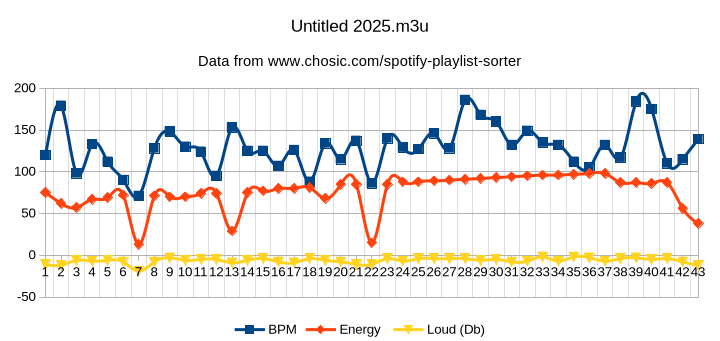

标题 ID \
许多 Markdown 处理器支持 标题 的自定义 ID——一些 Markdown 处理器会自动添加它们。添加自定义 ID 允许您直接链接到标题并使用 CSS 修改它们。要添加自定义标题 ID,请在与标题同行的花括号中括起自定义 ID。
My Great Heading \
HTML 如下所示
My Great Heading
链接到标题 ID 您可以通过创建带有数字符号 (#) 和自定义标题 ID 的 标准链接 来链接到文件中带有自定义 ID 的标题。这些通常称为锚链接。
Markdown HTML 呈现的输出 标题 ID 标题 ID
标题 ID 其他网站可以通过将自定义标题 ID 添加到网页的完整 URL 来链接到标题(例如,标题 ID)。
UML等图
前置条件: 项目中需要引入指定的js文件实现渲染转换,后续再引入该功能